Use the phone app, and what it changes
Parrot’s app for the Bebop 2 is FreeFlight Pro, and it has been removed from the Play Store. The app that is still on the store is the wrong one. This page covers which is which, how we got the right one running on a lab phone, and one finding that matters before you connect it to your own drone.
What we know, and what we do not
Section titled “What we know, and what we do not”We compared the drone’s own telemetry before and after the app sessions. That comparison is the measured part: three values changed, and every other value in that file stayed the same (maximum altitude 30 m, maximum distance 2000 m, tilt, vertical speed, rotation speeds, hull protection, outdoor mode, autorecord and country).
What we know. The cause is in the app. When it connects to a drone, it saves its own copy of about twenty settings, reads the drone’s settings, and then writes its saved values back to the drone. The list includes the return-home delay, the geofence and banked turn. We found this in the app’s code, and the drone’s own log of a later connection shows the app writing those settings about two seconds after it connects.
What we infer. The first connection, before the battery swap, almost certainly did the damage. A freshly installed app has no saved settings, so it writes its built-in defaults, and the app’s defaults are a 3-second return-home delay and banked turn on, which are exactly the values our drone ended up with. We cannot see that first session’s log, because the reboot for the battery swap erased it.
What the code says about the geofence. The geofence turning on is explained by the app’s decompiled code, which we read and did not run. The app does not replay its on-screen toggle. It replays a stored number that starts at 0, and the code treats 0 as “block flight beyond the maximum distance”, which is the geofence on. So a freshly installed app turns the geofence on, and that matches what the drone’s own log shows being written.
What it means for you. Expect the app to overwrite your drone’s settings with its own stored ones every time it connects, not only the first time. If you tighten a limit on the drone from another tool, connecting the app can write the old value back. Read your drone’s settings before and after connecting.
One more thing the app does on connect: it sets the drone’s clock. The Bebop 2 has no battery-backed clock and starts at the epoch, so until a phone app connects, timestamps on the drone count time since boot and are not real dates.
The wrong app: FreeFlight 6 USA
Section titled “The wrong app: FreeFlight 6 USA”A Play Store search for Parrot’s app returns FreeFlight 6 USA, version 6.10.6. It does not work with a Bebop 2 or a Skycontroller 2. Its decompiled device lists name only ANAFI drones (4K, Thermal, 2, UA, USA, 3 and 3 USA) and Skycontroller 3 and later. We tested it live with the phone on the drone’s own network, and the app never detected the drone. The bundle also carries no Bebop firmware.
The right app: FreeFlight Pro 5.2.7
Section titled “The right app: FreeFlight Pro 5.2.7”FreeFlight Pro (com.parrot.freeflight3) is the Bebop 2 and Disco app. It is no longer on the Play Store, and we did not work out whether it was delisted or just limited by region. The one copy we found was a third-party upload on archive.org, and we checked it before installing it.
- The signing certificate belongs to Parrot (subject
CN=Parrot Mykonos, created in 2011). - Its version code, size and certificate fingerprints match the listing on APKMirror, and the same key signs a much older Parrot app.
- The 158 MB data file that comes with it carries no signature at all, so we could only check that it arrived intact.
A match like that rules out a re-signed copy. It cannot prove nobody tampered with the file, so use it on a spare phone with no accounts, as we did. We installed it by adb, copied the data file into place, allowed storage and location, and declined the Parrot sign-in. No account was ever created.
What it does once connected
Section titled “What it does once connected”It connects on its own. The home screen shows the drone by its network name (not a model name), the battery level and the free storage. The settings have four tabs: Interface, Piloting, Safety and Video. There is no firmware page, and no boot, flight count or flight time anywhere, so we could not read those numbers from Parrot’s app.
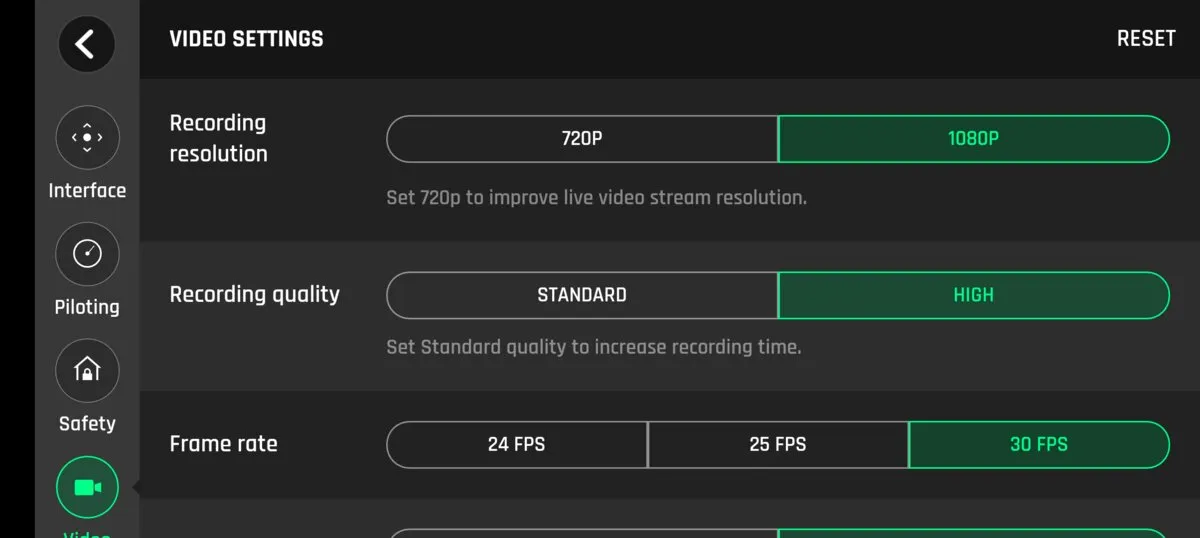
The Video tab says “Set 720p to improve live video stream resolution.” That fits a measurement made separately on the wire, where the live stream was 856 by 480 while the drone recorded at 1080p. It agrees with that figure but does not state it.
Two practical traps
Section titled “Two practical traps”Android routes around the drone. The drone’s network has no internet, so Android treats it as a poor connection and sends traffic over mobile data. From a phone, the drone can look unreachable until mobile data is off. In our test, pings to the drone failed completely with mobile data on and succeeded once it was off.
A second controller is not refused. We expected the drone to turn away a second app. It does not. It accepts the newcomer and quietly sends the telemetry there, while the first session keeps saying it is connected and gets nothing new. If two things seem to be connected and one has gone silent, that is the explanation.
How the Skycontroller connects
Section titled “How the Skycontroller connects”This part comes from reading a controller firmware image and not from the controller in our pack. In that image, the controller joins the drone’s Wi-Fi as a client at 192.168.42.3. It can also run an access point of its own at 192.168.44.1, forwards FTP to the drone, and has a service for a phone connected over USB.
That image turns out not to be our controller’s firmware. Its own library names the model it sets as the NG generation and not the Skycontroller 2, and a session reading the live controller reports a different model string and host name than the image sets. So take the addresses above as how one Skycontroller build works, and not as how a Skycontroller 2 does. The “v0.9.1” printed on its back is a label and most likely a hardware or production revision, so it says nothing about the firmware version. The controller’s own screen, or the app once the controller is connected, is how to read the real number.
Comments
Spotted a mistake, or tried this on your own Bebop? Leave a note. Comments are kept on this site's own server.